Utenti Pc Topic Unico

Stadium.png

PES 2019 Enhanced Turf Pack by Endo
https://sharemods.com/y3pvo2hgi486/Enhanced_Turf_Pack.rar.html

PASSWORD : pes2019evoweb

A combined turf pack for all PES 2019 Stadiums in CPK file. PES 2019 Enhanced Turf Pack by Endo also included Color Correction effect. This mod also works with MjTs-140914 Stadium Pack, so you can get a better turf in your PES 2019 PC game !

Installation :

1. Extract the file with WinRAR,

2. Copy .CPK file to your PES 2019 download folder
C:\Program Files(x86)\Steam\Steamapps\Common\PRO EVOLUTION SOCCER 2019\Download\

3. Generate with PES 2019 DpFileList Generator.


Ultima modifica:
image.jpg

https://www.mirrored.to/files/1KS2ALUR/PES2019_EvoSwitcher_1.3.rar_links
https://www.mediafire.com/file/wu9afqrlxzfwssy/PES2019_EvoSwitcher_1.3.rar/file
https://sharemods.com/dljzfvaagtjn/PES2019_EvoSwitcher_1.3.rar.html
Module : https://www.mirrored.to/files/1DOZ9F5S/modules.rar_links
PASSWORD V1.3 : ES19.3

PES 2019 EvoSwitcher 2019 by Ginda01 & MjTs-140914 Update 1.3

A combined tool of switcher between AutoSwitcher by Ginda01 & Multi-Switcher by MjTs-140914.

Features of PES 2019 EvoSwitcher 2019 by Ginda01 & MjTs-140914 :

Anthem (UCL and UEL)
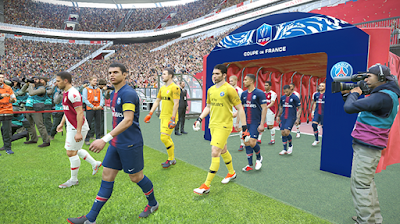
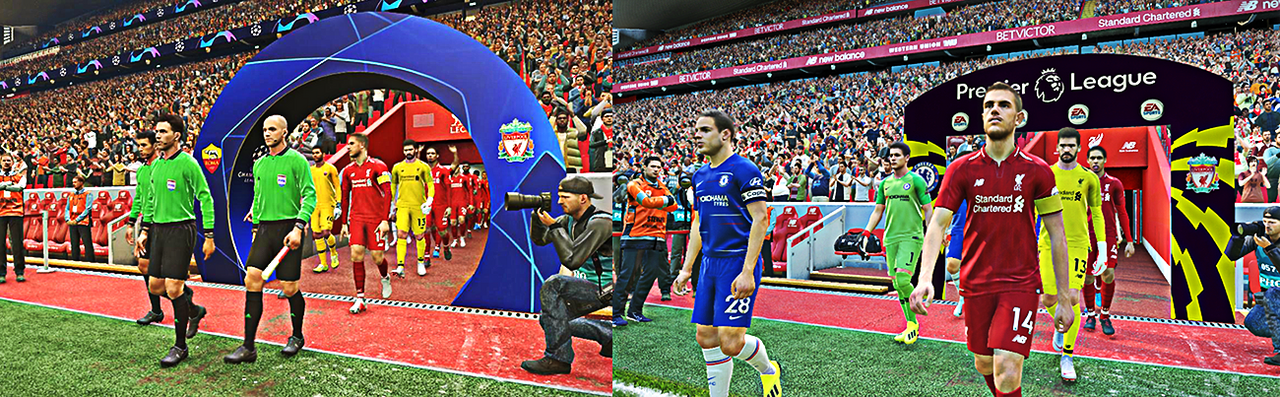
Entrance (Coupe de France, Premier League, UCL, UEL, USC)
Menu Music (UCL, UEL, USC)
Scoreboards (BBC Soprt, Coupe de France, ESPN, Fox Soccer, Premier League, Sky Sports, UCL, UEL, USC)
Trophy (UEL and USC)
Winner Celebration (Coupe de France and Premier League)
All work on Exhibitions, League/Cup, ML/BAL

Note :

- You can play without EvoSwitcher.exe, but if you want to hear the Anthem. You must play the game from EvoSwitcher. It's your choice

Changelog 1.3 :
Added Ligue 2 (Scoreboard, Entrance, Winner Platform)
Added Scoreboards: Bundesilga, Copa Libertadores & Superliga Argentina, Jupiler Pro League, UEFA Europa League
Added Stadium Boards: Premier League & Championship
Added UEL Final Anthem

Fix CPU Usage & Virus Detect

Changelog 1.2 :
Fix entrance scene UCL and UEL for all stadium
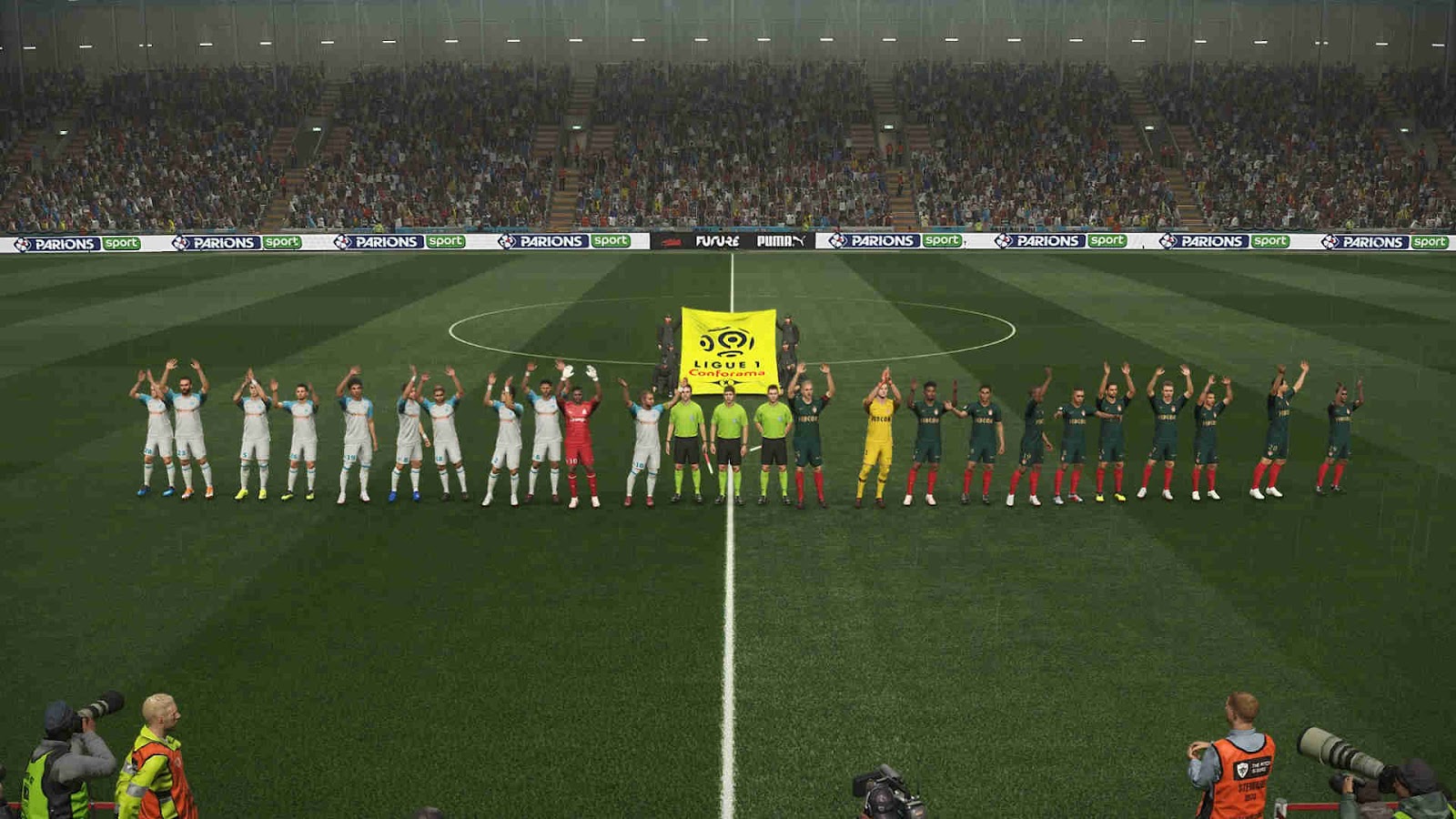
Added Ligue 1 Conforama (Scoreboard, Entrance, Winner Platform)
Added Spor Toto Süper Lig (Scoreboard, Entrance, Winner Platform)
Added UEFA Player of the Year Award
Updated Coupe de France @FuNZoTiK
Updated Fox Soccer Scoreboard
Fix Referee Kit: Work on Exhibition [If you choose team from the same league. Ex: PSG vs Monaco -> Ligue 1]
Fix UCL Anthem
Fix Random Scoreboard

Changelog 1.1 :

Fix entrance scene for all stadium
Fix UEFA Super Cup
Fix Winner Celebration
Removed Ball Cursor
Removed Carpet Ads @Hawke
Referee Kit @Hawke
Updated Coupe de France @FuNZoTiK

Installation :

1. Run the installer as admin to your PES 2019 PC game

2. Wait until finish

3. Play from EvOSwitcher !

Update v1.1
1. You need to install EvoSwitcher v1 AIO first !

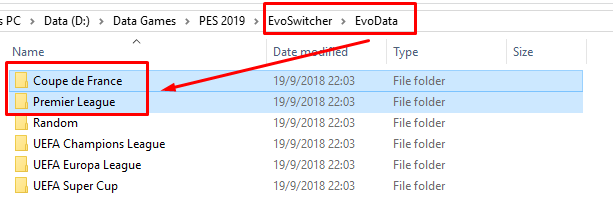
2. Delete Premier League and Coupe de France from EvoData


3. Delete Others from EvoScene
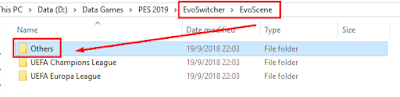


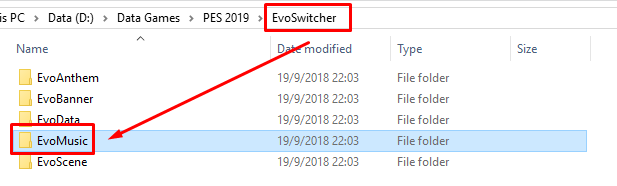
3. Delete EvoMusic from EvoSwithcer


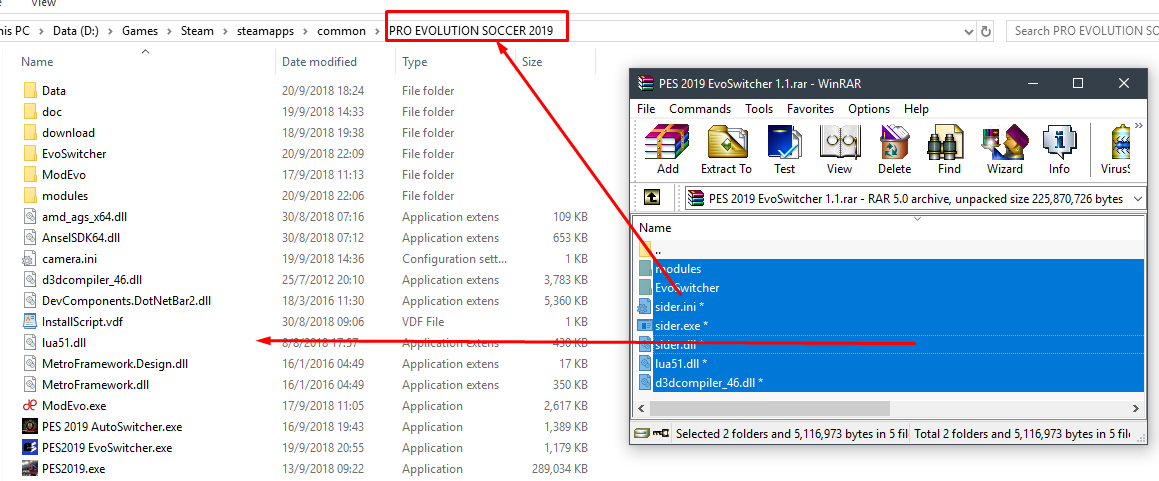
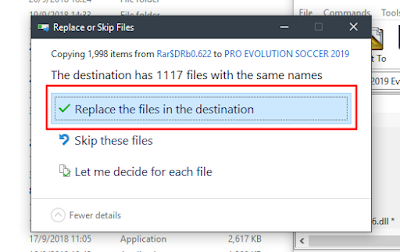
4. Extract PES2019 EvoSwitcher 1.1 with WinRar. And copy all files to PES 2019 Folder and replace all files !



Update v1.2
Copy and replace all files and folder to PES 2019 installation folder

Update v1.3
Copy and replace all files and folder to PES 2019 installation folder


Spero nel vostro aiuto...come mai quando faccio partire l'eseguibile PES2019 EvoSwitcher mi gira la "rotellina" un paio di volte e poi si ferma e non mi installa nulla...cosa sbaglio?
 
Son l'unico scemo che pensa che dopo sto aggiornamento il gioco sia diventato un flipper con animazioni pazze, veloci e sconnesse ? Boh .... Son 4 partite di fila in ml che va tutto a tremila allora senza fisica della palla senza pesantezza dei giocatori . Sembra hockey
 
Rinnovo la domanda, qualcuno esperto può spiegarmi la procedura per importare le faces(ne stanno uscendo molte di serie a)o come trasformarle in cpk?
Anche solo un tutorial di qualche programma da qualche parte, ho provato con CPGE v06 ma non trovo per esempio le faces come piatek che sono presenti solo nell'aggiornamento...
Oppure qualcuno che ha voglia di trasformarle in cpk!?
grazie
 
Son l'unico scemo che pensa che dopo sto aggiornamento il gioco sia diventato un flipper con animazioni pazze, veloci e sconnesse ? Boh .... Son 4 partite di fila in ml che va tutto a tremila allora senza fisica della palla senza pesantezza dei giocatori . Sembra hockey
Io preferisco competizioni brevi o singoli campionati proprio perchè la ML è programmata malissimo, e alla lunga diventa solo frustrante (parere personale), purtroppo se si gioca bisogna accettarla per quello che è, e non ci sono parametri che si possono correggere o quant'altro... bisognerebbe riscriverla da zero!
 
  • Mi piace
Reazioni: J.Zanetti90
@bjama
Creati una serie di cartelle l'una dentro l'altro che realizzano il seguente percorso volti/Asset/model/character/face/real (la cartella volti ossia la prima, io l ho chiamata così ma puoi chiamarla come ti pare, le altre invece devono essere chiamate così come scritto) scaricato il volto del singolo giocatore, avrai (caso 1: una cartella con un numero che è l identificativo del giocatore stesso oppure caso2: due cartelle, una sempre con il numero e l altra solitamente con il nome del giocatore) che sia il caso 1 o 2 trascini questa cartella/e all'interno della cartella real creata precedentemente. Se ti sei scaricato faccio per dire 100 volti fai lo stesso per ogni singolo giocatore (in questo modo ti vai a creare un solo file .cpk che contiene tutti e 100 i volti) fatto questo per crearti il cpk scaricati il software cri packed file maker. È semplicissimo da usare una volta aperto carichi o trascini al suo interno la cartella che io ho chiamato volti quindi cliccando sul tasto "build cpk" otterrai il fike cpk che poi carichi nel generator come un qs file cpk... dovrebbe andare tutto bene! Si possono avere problemi coi volti quando cambiano gli "id" ma li aspetta il facemaker che sistemi, potresti intervenire pure tu stesso ma la procedura non è semplicissima in quanto dovresti usare un compilatore esadecimale. Credo di aver detto tutto...
 
  • Mi piace
Reazioni: deko23 e bjama
The following dt18 have as start base the dt18_x64_v2_2

dt18_x64_2_2_EVO_0https://www78.zippyshare.com/v/zDiE5tab/file.html


dt18_x64_2_2_EVO_1
https://www78.zippyshare.com/v/pW5ISFHu/file.html (a little more difficult than EVO_0)

dt18_x64_2_2_EVO_2
https://www78.zippyshare.com/v/W5nvXlGC/file.html (the same of EVO_1 but with a mod on the keepers)

Scusate l'inglese ma a quest'ora sono davvero stanco e fra 2 ore devo andare a lavorare..Un salutone a tutti.
Grazie @incas36
 
  • Mi piace
Reazioni: incas36
The following dt18 have as start base the dt18_x64_v2_2

dt18_x64_2_2_EVO_0https://www78.zippyshare.com/v/zDiE5tab/file.html


dt18_x64_2_2_EVO_1
https://www78.zippyshare.com/v/pW5ISFHu/file.html (a little more difficult than EVO_0)

dt18_x64_2_2_EVO_2
https://www78.zippyshare.com/v/W5nvXlGC/file.html (the same of EVO_1 but with a mod on the keepers)

Scusate l'inglese ma a quest'ora sono davvero stanco e fra 2 ore devo andare a lavorare..Un salutone a tutti.
Quando puoi ci dici se sei partito dall'exe 1.03 e rispetto ai precedenti su cosa hai lavorato maggiormente...grazie
 

PES 2019 Ballpack Season 2018/2019 by Hawke
New ball pack from Hawke. All these balls have been updated to 2018/2019 Season and works for Pro Evolutuion Soccer 2019 PC. All credit & thanks goes to Hawke for this amazing mods !
CPK VERSION

https://mega.nz/#!01kDhB6I!9gyQhiJqXgZ2QLgGLd_emyAqSTut7i_83Nr4hzjtOt0

SIDER VERSION

https://mega.nz/#!V98zEDAS!yYIR_kWo_uXbb9fWjHZutFJJo59pazsdh6-ZOFMyI0E

BALL-SERVER VERSION

https://mega.nz/#!YhtxwTJK!5UcrfJjZ8-byPyoBAV0skmbDlk6zan8Jfywcygzz_k4

Ballpack Version

CPK version = 44 balls available at ball selection screen (balls are not relinked to leagues/cups)

Sider version = 44 balls available at ball selection screen (balls are not relinked to leagues/cups)

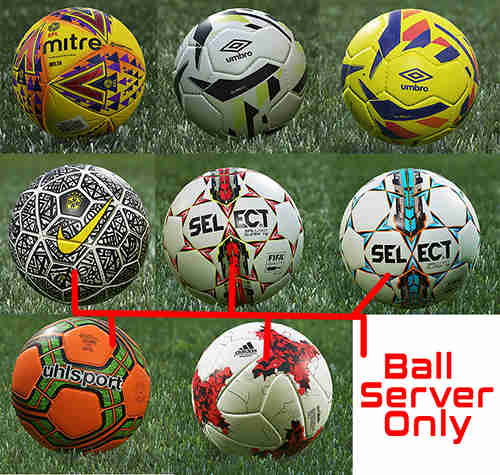
Ball-Server version = 73 balls available using Sider overlay menu (balls are relinked to leagues/cups including winter balls)

NOTES

- CPK & Ball-Server versions can be used together. (so you can use ball selection screen & Sider overlay menu)
-
Sider & Ball-Server versions can be used together. (so you can use ball selection screen & Sider overlay menu) This is MY chosen method
Installation :

CPK version [ Easiest Install for Newbies ]
Place the "ball_pack_v5.cpk" in the PES2019 download folder "C:\Program Files (x86)\Steam\steamapps\common\PRO EVOLUTION SOCCER 2019\download" & add to DpFileList.bin with DpFileList Generator 2019 v1.1 by Baris

Sider version
Place the "Balls" folder inside your Sider folder & add the line cpk.root = ".\Balls" to your sider.ini ..Make sure you have no other/old ball packs installed in either cpk.root folders or the PES2019 download folder, this is an AIO pack..no other packs are needed.

Install:
Ball-Server version
See here for initial Ball-Server module install [ Ball Server Module for PES 2019 ]. Once Ball-Server is installed you can update the ball pack by following the info below

How to apply the ball pack update for Ball-Server: download the ball-server pack update from the download link, extract the archive and overwrite the current content folder in your Sider with the content folder from the update pack

 
  • Mi piace
Reazioni: deko23
How To Change PES Faces Folder version in CPK.
If you download a face for your PES which is not as .ckp file but as a folder (with ID or not) then this tutorial will teach you how to create cpk and import in DpFileList Generator.

Let’s use Bonucci Face by Prince Hamiz as example.

– download PES 2018 Face template from here and extract folder
– download “Leonardo+Bonucci+PES+2018+by+Prince+Hamiz.rar” and extract
– inside you will find this a 33079 folder (which is the ID of this face)


* if you will others faces without ID use pesmaster site. Search player and see ID here:


– copy 33079 folder in PES 2018 Face Template\Asset\model\character\face\real


– open CRI File Systems Tools 2.40.13 – run CRIPackedFileMaker.exe as administrator – otherwise won’t work), then open PES 2018 Face Template location and start building “PES 2018 Face Template” folder with Bonucci Face –> click “Build CPK file…”


In CPK path, you can rename your own CPK file or your save location:


  • for example Bonucci.cpk and click “Start to Build”


* now can add generated folder face in .CPK file format with DpFileList Generator.

  • copy “Bonucci.cpk” to
C:\Program Files\Steam\Steamapps\Common\Pro Evolution Soccer 2017\download\

or
C:\Program Files\Steam\Steamapps\Common\Pro Evolution Soccer 2018\download\
C:\Program Files\Steam\Steamapps\Common\Pro Evolution Soccer 2019\download\

  • Generate with latest DpFileList Generator (see tutorial) and Play the Game!
 
  • Mi piace
Reazioni: deko23 e Holland_
Spero nel vostro aiuto...come mai quando faccio partire l'eseguibile PES2019 EvoSwitcher mi gira la "rotellina" un paio di volte e poi si ferma e non mi installa nulla...cosa sbaglio?
AIUTO!!!
Se mi dite che la versione AutoSwitcher è equivalente vado avanti con questa che non mi dava problemi, altrimenti chiedo a voi perchè non riesco a far partire la EvoSwitcher!
 
The following dt18 have as start base the dt18_x64_v2_2

dt18_x64_2_2_EVO_0https://www78.zippyshare.com/v/zDiE5tab/file.html


dt18_x64_2_2_EVO_1
https://www78.zippyshare.com/v/pW5ISFHu/file.html (a little more difficult than EVO_0)

dt18_x64_2_2_EVO_2
https://www78.zippyshare.com/v/W5nvXlGC/file.html (the same of EVO_1 but with a mod on the keepers)

Scusate l'inglese ma a quest'ora sono davvero stanco e fra 2 ore devo andare a lavorare..Un salutone a tutti.
Impagabile
Grazie caro ;)
How To Change PES Faces Folder version in CPK.
If you download a face for your PES which is not as .ckp file but as a folder (with ID or not) then this tutorial will teach you how to create cpk and import in DpFileList Generator.

Let’s use Bonucci Face by Prince Hamiz as example.

– download PES 2018 Face template from here and extract folder
– download “Leonardo+Bonucci+PES+2018+by+Prince+Hamiz.rar” and extract
– inside you will find this a 33079 folder (which is the ID of this face)


* if you will others faces without ID use pesmaster site. Search player and see ID here:


– copy 33079 folder in PES 2018 Face Template\Asset\model\character\face\real


– open CRI File Systems Tools 2.40.13 – run CRIPackedFileMaker.exe as administrator – otherwise won’t work), then open PES 2018 Face Template location and start building “PES 2018 Face Template” folder with Bonucci Face –> click “Build CPK file…”


In CPK path, you can rename your own CPK file or your save location:


  • for example Bonucci.cpk and click “Start to Build”


* now can add generated folder face in .CPK file format with DpFileList Generator.

  • copy “Bonucci.cpk” to
C:\Program Files\Steam\Steamapps\Common\Pro Evolution Soccer 2017\download\

or
C:\Program Files\Steam\Steamapps\Common\Pro Evolution Soccer 2018\download\
C:\Program Files\Steam\Steamapps\Common\Pro Evolution Soccer 2019\download\


  • Generate with latest DpFileList Generator (see tutorial) and Play the Game!
Cominci sul serio a farmi paura :D
Grazie infinite ;)
 
  • Mi piace
Reazioni: Cloud80
Io preferisco competizioni brevi o singoli campionati proprio perchè la ML è programmata malissimo, e alla lunga diventa solo frustrante (parere personale), purtroppo se si gioca bisogna accettarla per quello che è, e non ci sono parametri che si possono correggere o quant'altro... bisognerebbe riscriverla da zero!
.... È vero perché poi dopo ho giocato una amichevole e sembrava un altro gioco ... Che schifo
 
@bjama
Creati una serie di cartelle l'una dentro l'altro che realizzano il seguente percorso volti/Asset/model/character/face/real (la cartella volti ossia la prima, io l ho chiamata così ma puoi chiamarla come ti pare, le altre invece devono essere chiamate così come scritto) scaricato il volto del singolo giocatore, avrai (caso 1: una cartella con un numero che è l identificativo del giocatore stesso oppure caso2: due cartelle, una sempre con il numero e l altra solitamente con il nome del giocatore) che sia il caso 1 o 2 trascini questa cartella/e all'interno della cartella real creata precedentemente. Se ti sei scaricato faccio per dire 100 volti fai lo stesso per ogni singolo giocatore (in questo modo ti vai a creare un solo file .cpk che contiene tutti e 100 i volti) fatto questo per crearti il cpk scaricati il software cri packed file maker. È semplicissimo da usare una volta aperto carichi o trascini al suo interno la cartella che io ho chiamato volti quindi cliccando sul tasto "build cpk" otterrai il fike cpk che poi carichi nel generator come un qs file cpk... dovrebbe andare tutto bene! Si possono avere problemi coi volti quando cambiano gli "id" ma li aspetta il facemaker che sistemi, potresti intervenire pure tu stesso ma la procedura non è semplicissima in quanto dovresti usare un compilatore esadecimale. Credo di aver detto tutto...


Grazie Thunder grazie di cuore:-)
 
  • Mi piace
Reazioni: ThunderGibson

PES 2019 Ballpack Season 2018/2019 by Hawke
New ball pack from Hawke. All these balls have been updated to 2018/2019 Season and works for Pro Evolutuion Soccer 2019 PC. All credit & thanks goes to Hawke for this amazing mods !
CPK VERSION

https://mega.nz/#!01kDhB6I!9gyQhiJqXgZ2QLgGLd_emyAqSTut7i_83Nr4hzjtOt0

SIDER VERSION

https://mega.nz/#!V98zEDAS!yYIR_kWo_uXbb9fWjHZutFJJo59pazsdh6-ZOFMyI0E

BALL-SERVER VERSION

https://mega.nz/#!YhtxwTJK!5UcrfJjZ8-byPyoBAV0skmbDlk6zan8Jfywcygzz_k4

Ballpack Version

CPK version = 44 balls available at ball selection screen (balls are not relinked to leagues/cups)

Sider version = 44 balls available at ball selection screen (balls are not relinked to leagues/cups)

Ball-Server version = 73 balls available using Sider overlay menu (balls are relinked to leagues/cups including winter balls)

NOTES

- CPK & Ball-Server versions can be used together. (so you can use ball selection screen & Sider overlay menu)
-
Sider & Ball-Server versions can be used together. (so you can use ball selection screen & Sider overlay menu) This is MY chosen method
Installation :

CPK version [ Easiest Install for Newbies ]
Place the "ball_pack_v5.cpk" in the PES2019 download folder "C:\Program Files (x86)\Steam\steamapps\common\PRO EVOLUTION SOCCER 2019\download" & add to DpFileList.bin with DpFileList Generator 2019 v1.1 by Baris

Sider version
Place the "Balls" folder inside your Sider folder & add the line cpk.root = ".\Balls" to your sider.ini ..Make sure you have no other/old ball packs installed in either cpk.root folders or the PES2019 download folder, this is an AIO pack..no other packs are needed.

Install:
Ball-Server version
See here for initial Ball-Server module install [ Ball Server Module for PES 2019 ]. Once Ball-Server is installed you can update the ball pack by following the info below

How to apply the ball pack update for Ball-Server: download the ball-server pack update from the download link, extract the archive and overwrite the current content folder in your Sider with the content folder from the update pack

Cloud una precisazione...se voglio mettere la Ball-server version in cui a quanto ho capito ci sono 73 palloni in tutto e sono tutti impostati nelle diverse competizioni nel mio cpk devo avere solo questo file palloni.cpk e gli altri li devo eliminare giusto?
 
ah e poi volevo rinnovare una domanda che avevo fatto ma non ho avuto risposta...per giocare online non perdendo le modifiche del "nostro" FO come faccio?
 

Statistiche forum

Discussioni
38,665
Messaggi
2,081,483
Utenti registrati
80,545
Ultimo utente registrato
god55inggod55